RS Edges To Curves#
About#
Converts selected edges to curves: one curve for every connected run of edges.
Example
Installation#
Compatibility#
| Maya | 2024 | 2025 | 2026 | 2027 |
|---|---|---|---|---|
| ✓ | ✓ | ✓ | ✓ |
| Python | 2.7 | 3.x |
|---|---|---|
| ✓ |
How to install#
-
Extract RS_Edges_To_Curves.pyc from RS_ToolPack3_MAYAVERSION.zip (the zip for your Maya version, e.g. RS_ToolPack3_M2026.zip for Maya 2026)
-
Copy RS_Edges_To_Curves.pyc to :
-
Launch / Restart Maya
-
In Maya, open a Python Tab in the Script Editor and execute :
Attention
Please make sure that there are no Space characters in front of each code line.
Interface#
Tool Menu#
Info
The Tool menu is located in the top right corner of the toolkit.
-
Up arrow closes all tabs
-
Down arrow opens all tabs
-
The
 icon opens a new window with information about the tool
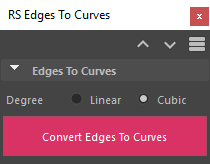
Edges To Curves#
How to use
- Select edges, also several separate runs of edges and on several objects
- Choose a Degree:
- Linear: straight segments through the vertices
- Cubic: a smooth curve
- Click on Convert Edges To Curves to run the script
Curves
- Edges that touch each other become one curve; every separate run becomes its own curve
- A closed edge loop becomes a closed curve
- A single edge always becomes a straight (linear) curve
- The curves stay linked to the mesh: when you move or edit the mesh, the curves follow. To unlink them, delete the history of the curves (Edit > Delete by Type > History)